Someone posts advice you think is wrong. You write a blunt comment, ask an AI tool to make it more professional, and get back: “Absolutely agree! Such an important perspective.” The draft is friendlier. Your point has disappeared.
To disagree well on LinkedIn, name the particular claim you question, explain the reason, and show what you would change. You can do that without praising an idea you reject or making a judgment about the person who posted it.
The examples below are fictional writing exercises. They are meant to show the editing decisions, not to serve as comments to paste into unrelated threads.
Decide what you actually disagree with
Read the whole post, including any linked material you intend to challenge. Check whether the author has already qualified the claim in a later comment. A sentence that sounds universal on its own may describe a particular situation.
Then finish this sentence in your own notes: “I disagree with [the claim] because [my reason].” If you cannot fill in both parts, you may need to ask a question or do more reading before taking a position.
Four different objections need different replies:
- A factual error: The number, definition, or description is wrong. Give the correction and evidence.
- A missing condition: The advice may work, but only under circumstances the post leaves out. Name the condition.
- A different priority: You accept the tradeoff but would choose differently. Explain what you value more in this situation.
- A conclusion that goes too far: The evidence supports a narrower claim. Say where the evidence stops.
“This is bad advice” leaves readers guessing which problem you see. Choosing the objection first makes the comment easier to write and easier to answer. For other kinds of contributions, the general LinkedIn comment guide covers questions, examples, and practical additions.
Four disagreements, rewritten
1. Correct a number without making it personal
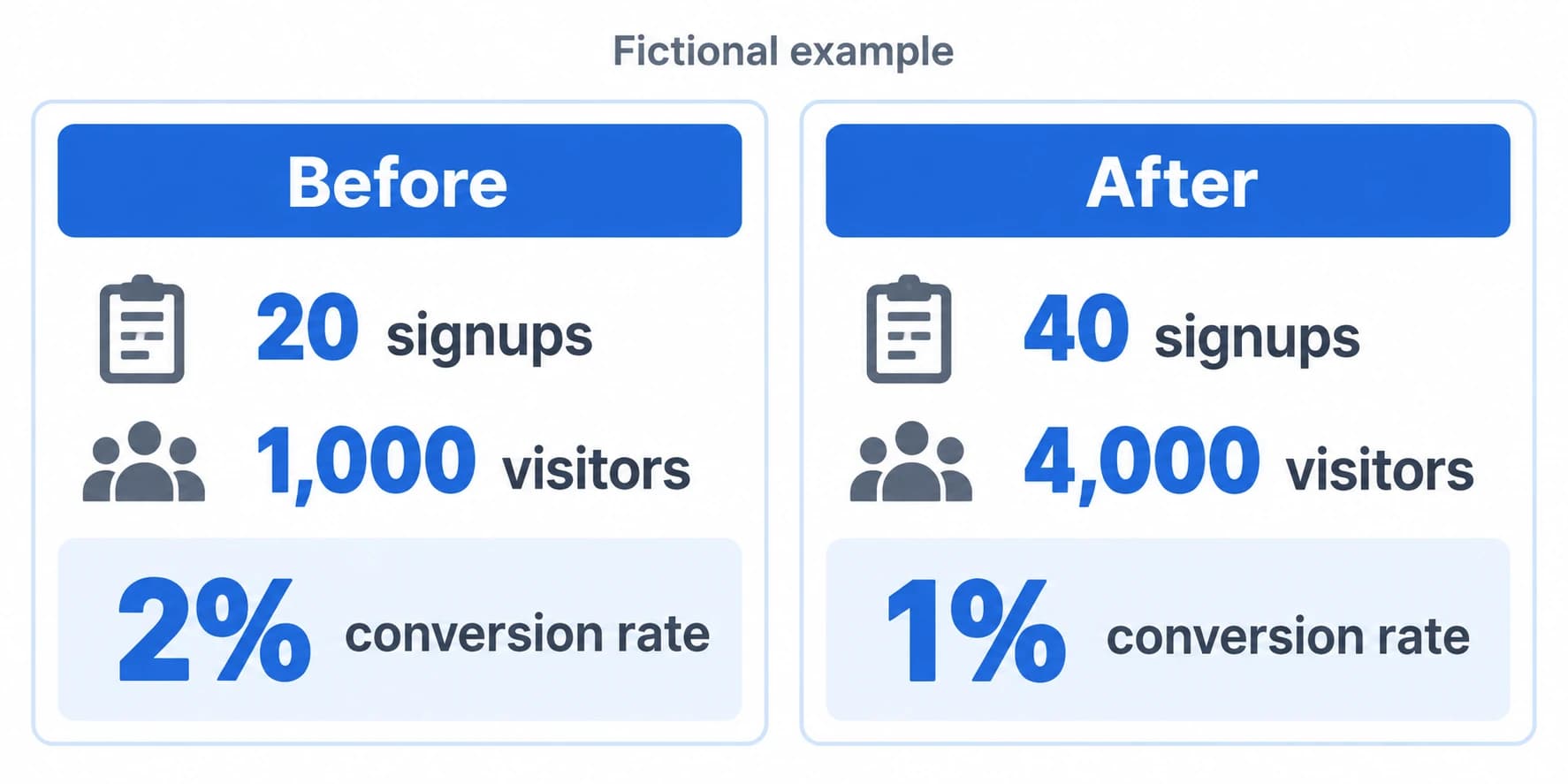
Suppose a post reports 20 signups from 1,000 visitors before a redesign and 40 signups from 4,000 visitors afterward. It calls the increase a doubling of the conversion rate.
First draft: “Your math is wrong. This is why people shouldn't trust growth posts.”
Useful edit: “The signup count doubled, but those figures put the conversion rate at 2% before and 1% afterward. I'd separate the traffic increase from the conversion-rate result.”
The edit gives readers the calculation they need. It does not claim the redesign caused the lower rate; those before-and-after figures alone cannot establish that either. When a correction depends on outside information rather than arithmetic, link the specific primary source and check its date and scope.
2. Add the condition that changes the advice
Post: “If a customer asks for a call, always book one. Sending documentation is bad service.”
First draft: “That's a terrible use of a small team's time.”
Useful edit: “I'd handle a setup question differently from a problem that needs live troubleshooting. For a setup question, I'd send the relevant steps first and offer a call if those don't resolve it.”
This still disagrees with “always.” It also explains an alternative the reader can assess. There is no invented story about what happened at your company and no claim that calls are generally a waste.
You can make the distinction more direct if needed: “I disagree with making a call the default for every request.” A clear opening does not need a cushion of compliments.
3. Explain a different priority honestly
Post: “Every client report should be fully automated. Manual analysis doesn't scale.”
First draft: “You clearly care more about efficiency than your clients.”
Useful edit: “I'd automate the data collection and keep a person responsible for the interpretation. For a report used to decide next month's spending, I'd prioritize explaining an unusual result over removing every manual step.”
The original draft invents the author's motive. The revision identifies the decision and the priority behind your view. You might still disagree after the author explains their process. That is a reasonable outcome.
Only mention clients or results as your own experience when they really are yours to discuss. Building credibility through comments depends on keeping your claims within what you can support.
4. Question a conclusion without pretending to know more
Post: “We removed our onboarding checklist and activation improved. Checklists are the problem.”
First draft: “That's correlation, not causation. Basic stuff.”
Useful edit: “Did anything else change in onboarding during the same period? The improvement is useful to know about, but I'd want to separate the checklist change from other changes before recommending its removal.”
Ask this only if the post or its linked analysis has not already answered it. You are identifying missing evidence, not proving the author's conclusion false. If you have not inspected the results, do not imply that you have.
Keep AI editing from changing your position
Give the assistant your rough point before asking for a tone adjustment. “Make this professional” leaves too much of the job unspecified. A better brief names what must survive the edit.
For the customer-call example, you could use:
Help me shorten this LinkedIn comment. My view is that a call should not be the default for every customer question. Keep the distinction between a setup question and live troubleshooting. Use plain language and two or three sentences. Do not add agreement, compliments, claims about my experience, or assumptions about the author's motives. If you need a fact I haven't supplied, flag the gap instead of filling it in.
Keep private customer and workplace details out of the brief. Then compare the draft with your original position. Look especially for these changes:
- “I disagree” has become “I completely agree, but…”
- “In this situation” has become “always” or “never.”
- “I'd try” has become “I've seen this work with hundreds of clients.”
- A practical objection has become a judgment about the author's competence.
Repair the changed meaning before adjusting the rhythm or word choice. You can also discard the draft and use your original sentence.
LinkedIn's September 2026 update on AI-generated content describes a shift toward proofreading and clarity while preserving the member's voice. That is a useful editing goal here: the finished comment should still express your own reasoning.
ReplyPilot's documented workflow uses /rp to request a reply draft in a supported field; you check the result and manually post it. Personalization settings can provide recurring style guidance. For a disagreement, supply your position for that specific post rather than expecting saved tone preferences to choose it for you.
Check the tool workflow separately from the wording. LinkedIn's User Agreement restricts certain extension and automated activities. Reviewing a draft manually does not establish that every third-party extension workflow is permitted.

Handle the answer you get
A disagreement is an invitation to explain your reasoning further. Read the response before generating another version of the same objection.
If the author adds a missing condition, acknowledge it. For the reporting example: “Thanks, that clarifies it. If the automation collects the data and someone still reviews the interpretation, that addresses my concern.” Do not keep arguing against a position they have just clarified they do not hold.
If new evidence changes your view, say what changed. “I missed that the comparison used the same traffic source. That answers my question about the audience change; I'd still want to understand the other onboarding changes.” You can accept one correction without pretending every question is settled.
If you remain unconvinced, state the remaining difference once. “I see why you prioritize a call. For a straightforward setup question, I'd still start with written steps so the customer can try them when convenient.” There is no need to add a question merely to keep the exchange going.
Know when to leave the comment unwritten
Skip a reply when making your case would expose confidential information, when you have no evidence for the accusation you want to make, or when the exchange has become repetitive and personal. A public thread is also a poor place to settle an unresolved workplace dispute with a colleague.
You do not owe harassment a carefully edited response. LinkedIn's Professional Community Policies prohibit personal attacks, abusive conduct, and disruptive repetitive behavior. Use the platform's reporting options for suspected violations rather than assembling an audience to confront the person.
Before posting, read your comment beside the sentence it answers. Can someone identify the exact disagreement, the reason for it, and the boundary of your claim? If so, your point is clear enough to discuss. The other person does not have to agree for the exchange to be useful.